Sunday, December 29, 2013

Finding The Value Of The 1872 Dollar Today

At some point in your research/writing activities it’s quite likely you found yourself needing to know how money has appreciated over the past century or more. Here’s one example I was tangling with recently:

Away back in 1872 a pair of Kentucky cousins managed to swindle $600,000 from some of the smartest, wiliest financial men of New York and San Francisco. The pair got off scot-free. And  virtually none of the loot was ever recovered.

So how much is $600,000 worth today?

To find out all I have to do is go to a really useful website called MeasuringWorth. It was founded by a pair of professors back in 2006 with the mission of making reliable data available to the public about value comparison over time.

To try out one of their calculators, from the home page click Relative Values– US $ from the left-hand column.

This brings up a page that will “Compute the Relative Value of a U.S. Dollar Amount – 1774 to Present.”

In the window on the right all you have to do is fill in your parameters. In my case, the Initial Year is 1872 and the Initial Amount is $600,000. Because of the way the calculator is set up, set the Desired Year for last year or the year before.

Now click CALCULATE.  

The answer is not exactly simple or clear cut. MeasuringWorth gives you nine different values.

At the top of the page it says “In 2012 the relative value of $600,000 from 1872 ranges from $10,400,000 to $1,170,000,000.” That’s quite a range!

Below that is a box that says “A simple Purchasing Power Calculator would say the relative value is $11.6 million.”

What’s the best number to choose?

Reading through the definitions of the various value categories is helpful. But for folks like me, who are not well grounded in economics, it’s seriously confusing.

It’s easy enough to pick the $1.17 billion number—a sensational eye-opener worthy of Bernie Madoff. But I think a conservative value is more realistic and better serves my purpose. So for my book about the Kentucky cousins’ $600,000 swindle I chose $11.6 million, because it relates most closely to the “real price” and the “historic standard of living value.” And by anybody’s standard (except maybe the “Top 1%’s”) eleven million dollars is a lot of money.

MeasuringWorth.com also calculates other currencies, including the British pound sterling, the Australian pound and dollar, and China and Japan.

There is also a conversion calculator from dollars to pounds. How much was one British pound worth in dollars in 1890? Answer: $4.86. 

The Internet is full of sites offering these sorts of data conversions and analysis. And that’s what Finding Stuff is all about.

Happy New Year!

If this post was helpful or interesting to you, please let me know. I’m always looking for ways to improve the blog. 

Disclaimer: The description of web pages are accurate as of the date of the post. Like everything else in this digital world of ours, they can change in the blink of an eye.

Thursday, December 19, 2013

JPASS A Boon To Researchers

Regular readers of these columns will recall my complaints about really useful research sites which make you sign up for a year’s subscription even though you only need to make a few visits over the course of a week or two.
One of my favorite archival sites is the Times of London. And as I mentioned a couple of posts ago, this past summer they began to offer the Web Pack. First of all, it was cheap—$3 a week. And secondly, and most importantly to a periodic user, you can sign up for as little as one month —$12. A bargain for the right to search three centuries of history.

Which brings us to JSTOR.
 
JSTOR is a not-for-profit shared digital library created in 1995 to help university and college libraries free space on their shelves, save costs, and provide greater levels of access to more content than ever before. By digitizing content to high standards and supporting its long-term preservation, JSTOR aims to expand access to scholarly content around the world and to preserve it for future generations.

JSTOR currently includes more than 2,000 academic journals, dating back to the first volume ever published, along with thousands of monographs and other materials relevant for education. They have digitized more than 50 million pages and continue to digitize approximately 3 million pages a year. 


Though designed mainly for institutions, JSTOR has recognized that independent researchers would benefit from access to these vast databases. That’s why they created JPASS—a tool for folks like us that lets us browse or search over 7 million articles in 1500 journals on hundreds of subjects for as little as $19.50 month.

JPASS enables subscribers to read an unlimited number of articles in what they call the JPASS COLLECTION, and to download up to 10 of those a month (PDF).

I’ve been doing research on Presbyterian missionaries in Asia during the World War II period. And so I was pleased to find a variety of Presbyterian Historical Society publications available on JSTOR.


I chose the Journal of Presbyterian History (1997-2009), and typed Philippines missionaries into the search box.


There were 789 results, so I scrolled down through them until I found one that seemed to fit what I was looking for (it’s not shown on the image, but it’s called “The Presbyterian Mission on Hainan Island Under the Japanese, 1937-1941.”


Not needing to print the PDF, I just read through the article on the screen.


Overall the user interface on JSTOR/JPASS is pretty clean and intuitive, but it will take some effort to master it.

It’s great that a resource like JSTOR is now available to the hoi polloi. I hope that other databases that restrict public access realize they are missing out on a great revenue generator that also happens to be a great public service.

If this post was helpful or interesting to you, please let me know. I’m always looking for ways to improve the blog.

Disclaimer: The description of web pages are accurate as of the date of the post. Like everything else in this digital world of ours, they can change in the blink of an eye.

Tuesday, October 8, 2013

Federal Shutdown Interfering With Your Research? Try This.

If you've tried to access Federal government websites in the past week you know they don't work because of the shutdown. This is not a political forum  - it's all about research, and thanks to the Internet Archive's "Wayback Machine" a bunch of agencies' websites are still available to facilitate researching.

Start by going here: http://blog.archive.org/2013/10/02/governmentblackout/

That brings up the "Blacked Out Government Websites Available Through Wayback Machine."


There are a total of  13 agencies whose websites you can access:  NOAA, NPS, LOC, NSH, FCC, Census, USDA, USGS, ITC, FTC, NASA, ITA, and Corp for National Service. Just click on the links below the logos.

I checked out the LOC site and was able to go into digitized Historic Newspapers and do full searches of dates in the late 19th Century. That's pretty far into the site, so there must be all sorts of stuff (maybe everything?) available.

So, YAY! for the Internet Archive. These good folks are always looking for additional funding. If you use the Blacked Out sites, please make a contribution. I know I will.

If this post was helpful or interesting to you, please let me know. I’m always looking for ways to improve the blog. 

Disclaimer: The description of web pages are accurate as of the date of the post. Like everything else in this digital world of ours, they can change in the blink of an eye.


Monday, September 2, 2013

Submarines on the Web: The Historical Naval Ships Association


My research specialty is the Pacific Theater in World War II, with a focus on submarine warfare. In the past, to do research about the “war in the boats” it was necessary to make a trip to National Archives II at College Park, Maryland, because that’s where the really important primary materials live: the sub commanders’ “patrol reports” for the fifteen hundred-odd combat sorties made by U.S. submarines during WWII.

The patrol reports were very detailed, day-by-day accounts—diaries really—of events from the time the boat left its base until it returned sixty to ninety days later. These documents are not the same as the ship’s log, which kept track of things like speed, distance traveled, fuel used, weather and ocean conditions. The patrol reports kept track of things both mundane and monumental that happened on, or to, the ship, including narratives and data about attacks on Japanese vessels. Here is an entry from June 9, 1944, for USS Harder’s (SS257) fifth war patrol:


In the digital age it’s no longer necessary to travel to College Park to review these reports. Since 2009 all them—totaling some 63,000 pages—have been available online through the Historical Naval Ships Association website.


On the Patrol Reports page scroll down to the boat you’re looking for and left click. This brings up the file of all the patrol reports, special mission reports, and appendices available for that sub. In the case of USS Harder, that’s 325 pages of material covering six war patrols. The file will open at issuu.com, and you’ll need to use Issuu’s interface to scroll page-by-page through the reports. I was unable to find a way to print directly from Issuu, but you can download a PDF and print from that (BTW—the PDF is much easier to navigate). 

In order to do the download you’ll need to create an Issuu account—it’s simple and it’s free.


Once you’ve done that and you’re on the file’s start page, cursor down to the double-diagonal-arrow box to the right of the Facebook logo. Click on that and it brings up a full page view. Then, up toward the top right you’ll see another box with a page/arrow icon. Click on that and it brings up a menu of choices. Then click “download” and you can grab your PDF, either opening it or saving it.

Here’s another page from the Harder file, this one is a table outlining a successful attack on an enemy destroyer:


HNSA also has an online collection of U.S. Navy operations manuals, mostly WWII era, classified by type of ship. There are about thirty-three, including a fascinating German U-Boat commander’s handbook from 1943.


On another page are a series of sounds and videos , mainly of submarine operations. Here is a track of a submarine diving: 

 
In time, there will be a lot more digital material available online. Check back with these sources frequently. And, as they say to a departing boat: “Good luck and good hunting.”

If this post was helpful or interesting to you, please let me know. I’m always looking for ways to improve the blog. 

Disclaimer: The description of web pages are accurate as of the date of the post. Like everything else in this digital world of ours, they can change in the blink of an eye.

P.S. - USS Harder was lost on her sixth patrol, in August 1944.


Saturday, August 17, 2013

Summer Almost Gone - Updates

Wow. Summer is almost gone. Way out here in Northwest Montana autumn is one of the best times of the year, and I'm certainly looking forward to the cooler weather and the diminution of tourist traffic.

Remember how I complained about the London Times not having a good system for short term access to its vast archive? You had to buy a yearly contract, at 4 pounds a week (about $6 a week - a whopping $312 a year). That seemed a steep price to troll a treasure for just one project.

Well, bless their hearts, the Times has just introduced the Web Pack. For 2 pounds a week ($3) you have unlimited access to the Times, the Sunday Times, the puzzle archive (9,000 strong), and, best of all, the digital archive. And subscribing to the Web Pack now only requires a one month (minimum) contract. So if you're working on a Great War book or article or paper, then the Web Pack is a perfect device to let you see contemporary reporting on your subject.

Hooray for the London Times.

Speaking of Times, how about Time magazine? Their archive used to be free, but recently they added a pay-wall. But it is somewhat of an enlightened pay-wall. You can get a monthly digital subscription which gives you access to the archive for just $2.99. It's a one-month minimum, like the Times of London, and it will automatically renew every month until you cancel it. Even better, Time now offers a One Week Digital Pass that gives you access for just $4.99. That's a pretty good deal.

So, progress is being made to open up more digital archives to researchers and writers at reasonable rates. Hooray for that.

Look forward to more posts after the autumn equinox. Cheers.

Wednesday, May 8, 2013

The Fabric of a Nation: Historical Societies


The United States is dotted with thousands of Historical Societies. Some, like the Historical Society of Pennsylvania (mentioned in detail in the February 2, 2013 Finding Stuff post) are chock-a-block full of digital documents and finding aids. Others, like the tiny Russian River Historical Society in Monte Rio, California don’t have much in the way of textual sources, but have a splendid selection of digitized photographs—in this case images depicting life among the redwoods along the Russian River.


There are dozens of photographs in their gallery, dating from about 1890 through 2011—with the richest troves in the early 20th century. They are classified by town. All images are downloadable JPEGs of quite decent quality. However, all images have a white historical society logo watermark in the center of the frame.


For general research, the watermark is not a hindrance. But if you want to use clear images you’ll have to contact the society and order prints or digital copies (and get permissions). The charge for one 8x10 print is $17. And the charge for a single image on a CD is $15 plus $8 for the CD. Add $10 for shipping of either. In this age of ultra-modern telecommunications, it would seem better, faster, and cheaper if the RRHS could email the file as a .jpg. In the case of a digital scan that would save users $18 per order. Their photo order form says nothing about discounts for additional images. 


Down in the hometown of Apple you’ll find the Cupertino Historical Society and Museum. There, in the very heart of Silicon Valley, you might expect to find a fabulous trove of amazing stuff. Or not. The CHSM lists no digital resources on their website —no historical photos, no documents, no oral histories. What a disappointment. But they do list links to other local repositories, including the California History Center 
at Cupertino’s De Anza College.

The California History Center is a great source for South Bay Area materials. They have student research papers, thousands of photographs, hundreds of oral histories, maps, clippings, and other primary sources. Unfortunately none of this is yet available online—not even finding aids. (To be fair, some of their photos are available on the Silicon Valley History Online website.

Sticking around Northern California, there are two really good sources for stuff: The San Francisco Public Library and the California Historical Society.

On the former’s home page click on eLibrary. That takes you to a page of SFPL links. The two that are of most interest to researchers are SF Historical Photos and SFPL-Created Research Tools.


The photo collection has more than 38,000 online images available for download. If you go to the Browse by Subject page you’ll be confronted by a few dozen broad categories, like Banks, Bars, and Baseball. Some of the listing can be browsed alphabetically, others by subjects—Baseball, for example, is divided into Early, Giants, and Seals. And some categories have both features. 


Browsing Baseball, Seals, brings up 52 thumbnail images of that pre-Giants minor league team and their compact stadium.  


If you find an image you like, you can click on View Full Record for more information and click to a larger, downloadable, image. 


If you’re just researching, then this image will probably be fine. But for commercial use, you must get permission from the library. You may also order a print or a scan (the scan is certainly the better bet). For $15 you can get a 300dpi TIFF file of any existing image in the database.

The California Historical Society is also based in San Francisco. They currently have 23,000 records, only 40 of which are digitized. However, most of their Finding Aids are available online (in conjunction with the OAC—the Online Archive of California [more about this amazing resource in a later post]).


Navigate to the SearchCollections page and enter your search term(s) into either of the boxes provided (I usually start with the CHS’s). 


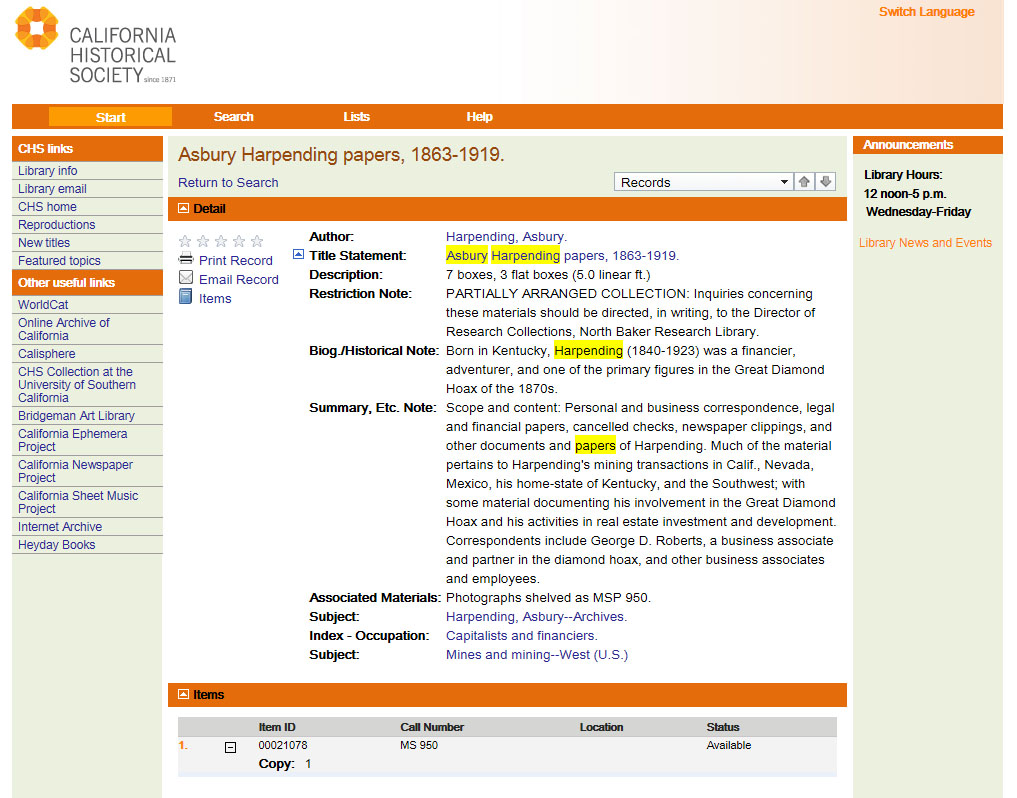
I wanted to know what they might have about my favorite old subject, Asbury Harpending. 

Type the name. Click. And up come four entries. The first is the one I’m really excited about: his Personal Papers. By clicking on that, the Finding Aid appears. It tells me that the CHS has ten boxes of material, three of which are flat (suggesting maps, plans, or other large items). There is a brief summary of the scope and content of the collection, but, alas, no box-level descriptions.


To troll Harpending’s papers I’ll either have to go to San Francisco myself (sounds like fun—great food!) or hire a researcher to fish for me.

The U.S. is abuzz with historical societies. The smaller ones, working on tiny budgets, and relying mainly on volunteers, are trying their best to catch up to the 21st century. But it will take time. If you want to speed up the process, consider volunteering at your local society. 

In the next post we’ll get take a look at the digital offerings of college and university special collections.
 
If this post was helpful or interesting to you, please let me know. I’m always looking for ways to improve the blog. 


Disclaimer: The description of web pages are accurate as of the date of the post. Like everything else in this digital world of ours, they can change in the blink of an eye.

Sunday, April 14, 2013

Sorry For The Delay

It's taking me a while to get to the next research post. That's because I picked up a pair of assignments from Military History Quarterly - one on the "Heliograph" (think of it as a "sun telegraph" using mirrors to flash the sun's rays  - see below) and the other on "Operations Research" (a rather esoteric discipline that looks to improve how systems work). I'm pretty much done with the first, and should be able to get to the post about Historical Societies before starting the second. Thank you for your patience.

The photo shows an early U.S. Army heliograph. On the right is the mirror system that reflects the sun's rays. On the left is a shutter used to send Morse Code dots and dashes by blocking the flash from the mirror. The range on these instruments could be over 100 miles (on a sunny day). They were invented c. 1869, and in use by armies around the world until after World War I.